
GitHub’s legal team faced a familiar workplace problem. Lawyers, programme managers and business professionals were repeatedly reviewing similar contracts or answering familiar legal questions. Previous guidance existed, yet people still had to find it and reconstruct the process for each matter.
That problem affects more than legal departments. Marketing teams repeatedly check briefs against brand rules. Operations teams classify requests and prepare standard responses. Creative teams turn approved material into familiar formats. In each case, useful knowledge exists but is scattered across documents, examples and individual experience.
GitHub says members of its legal team used Copilot CLI to organise some of this knowledge into reusable workflows. The valuable part of the account is the progression from individual prompting to a structured process that people could inspect and improve.
What Github
What GitHub’s legal team built
GitHub describes two related examples.
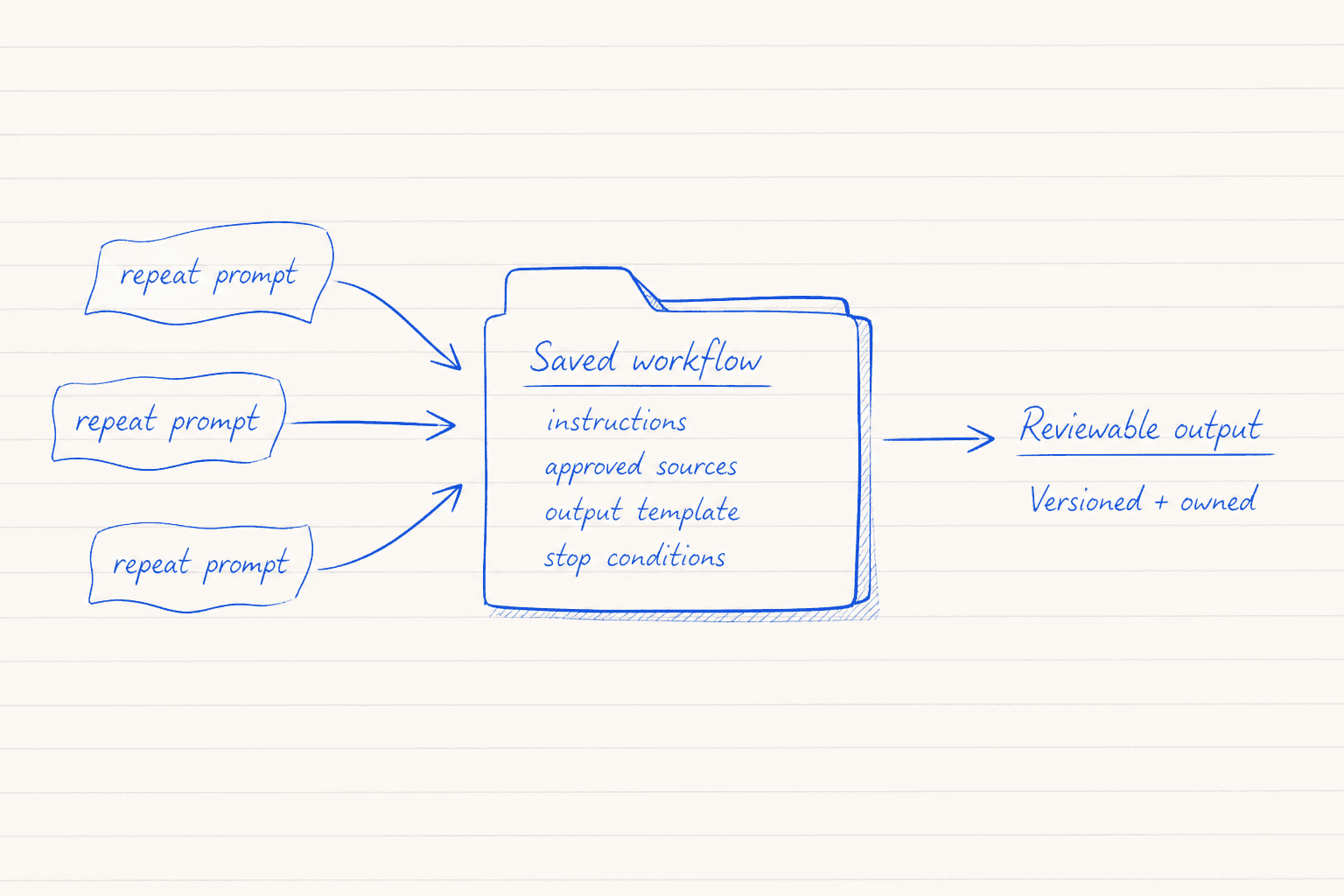
Principal Product Counsel Ngandu Kasuku created a contract drafting tool called terms-ai. He stored instructions, drafting resources and workflows in a repository rather than repeatedly copying prompts into individual sessions. The repository also contained a plain-language drafting guide and could draw on previously completed agreements.
GitHub reports that sensitive agreements remained in an approved internal environment with access controls. They were kept out of the open-source repository that contained the general workflow. Kasuku says the tool roughly halved his own review and drafting time while producing more consistent provisions. That is an individual result reported by GitHub, not a general benchmark for other teams.
Online Safety Counsel Jesse Geraci began with a narrower task: gathering and analysing information for Digital Millennium Copyright Act notice reviews. The initial workflow used plain-language instruction files, policy references and report templates. It later expanded into other areas including contract review, NDA triage and compliance checks.
Geraci describes the resulting system as decision support with human review at its centre. That boundary matters because a repeatable output can still contain an incorrect interpretation or miss facts that were never provided.
Three repeated prompt scraps flow into a saved workflow containing instructions, approved sources, an output template and stop conditions, producing a reviewable output.
Start With
Start with one small trial
Choose one recurring task with a known review process. The first trial should support a decision rather than make it.
A legal team might start with an intake summary for a familiar agreement type. The tool could identify the parties, relevant dates and clauses that differ from an approved template. A lawyer would still interpret those differences and decide what action to take.
For another department, the equivalent might be checking a campaign brief for missing information or turning approved meeting notes into a standard project update.
Keep the trial to one user, one workflow and three prepared cases. Define the expected output before involving the tool. If colleagues cannot agree what a good result contains, the workflow is not ready to automate.
Give Tool
Give the tool the working method
The AI needs more than a request for a good summary or a careful review. It needs the context that an experienced colleague would use.
Provide:
- a precise description of the task and its limits
- the approved policies or playbooks that govern the work
- a clear hierarchy for sources that might conflict
- examples of acceptable outputs using safe material
- a fixed output structure with required fields
- definitions for important internal terms
- conditions that require the tool to stop or escalate
The source hierarchy deserves particular attention. A current policy may outrank an old example. An executed agreement may apply only to one partner. Write those relationships down so the workflow does not treat every reference as equally authoritative.
OpenAI Academy describes similar habits in its workplace courses: giving clear instructions, adding relevant context and building review points into recurring work. Its course page supports the general method, although it does not document GitHub’s implementation.
Keep Sensitive
Keep sensitive material outside unapproved environments
A reusable workflow and the documents it processes should be treated as separate layers.
General instructions, report templates and non-sensitive style guidance may be suitable for a shared repository. Privileged advice, confidential agreements and personal information should stay outside the tool unless the organisation has approved that environment for the material concerned.
Also exclude credentials, private keys and production access that the task does not need. Remove irrelevant personal or commercial information before preparing test cases.
GitHub’s account says terms-ai kept sensitive agreements inside an approved environment while its general workflow was open source. Other organisations need to check their own contracts, professional duties and information policies. A repository structure does not establish permission by itself.
The authority to approve legal language or accept risk should also remain with the responsible person. The tool can prepare evidence and highlight differences. It should not silently turn those observations into a final decision.
Review Output
Review the output in a fixed order
A clear review method makes faults easier to spot and discuss. Use the same sequence for every trial output:
1. Check completeness. Confirm that every required field is present. Mark absent source information as missing rather than allowing the tool to fill gaps. 2. Trace the evidence. Match each material statement to the supplied document or policy. Reject claims that cannot be traced. 3. Check the rules. Compare the result with the approved playbook and confirm that the correct source took priority. 4. Apply professional judgement. Ask whether the recommendation fits the actual circumstances and risk. This remains the human reviewer’s responsibility. 5. Record the correction. Note the error type and the change needed in the workflow. Do not repair only the final document if the same fault could recur.
A five-step handwritten route checks completeness, evidence, rules, judgement and correction while keeping sources, AI analysis and human decisions distinct.
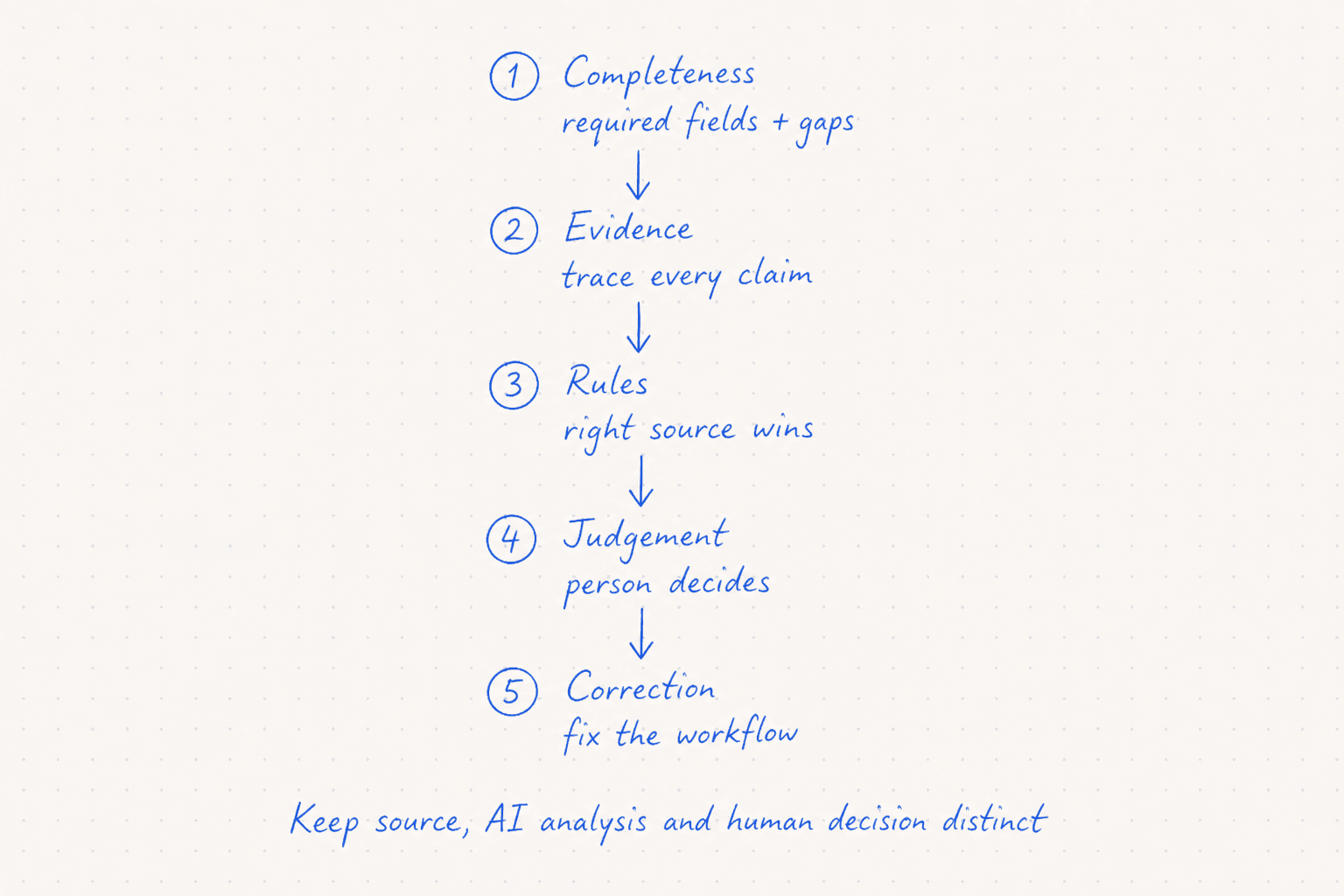
A reviewer should be able to distinguish source text, AI-generated analysis and the human decision. Combining them into one polished answer makes unsupported reasoning harder to detect.
Three Tests
Run three tests before wider use
### The normal test
Use a familiar case with complete information and an agreed answer. For contract intake, this could be a standard agreement based on the current approved template.
Check whether the workflow extracts the right facts, follows the expected structure and identifies known differences. A fluent response still fails if it cites the wrong source or omits a required field.
### The missing-information test
Remove a fact that the process needs, such as the governing jurisdiction or the relevant approval threshold.
The expected behaviour is a clear request for the missing information or an escalation. A confident guess is a failure. Update the instructions if the tool proceeds without the required context.
### A realistic edge case
Use a partner addendum that conflicts with an older agreement or contains an unfamiliar clause outside the playbook.
The workflow should identify the conflict and preserve both sources for review. It should not merge them into a convenient answer. A qualified person then decides which document governs and whether specialist advice is needed.
Normal, missing-information and exception cases feed a permanent test-pack folder that is rerun after every workflow change.
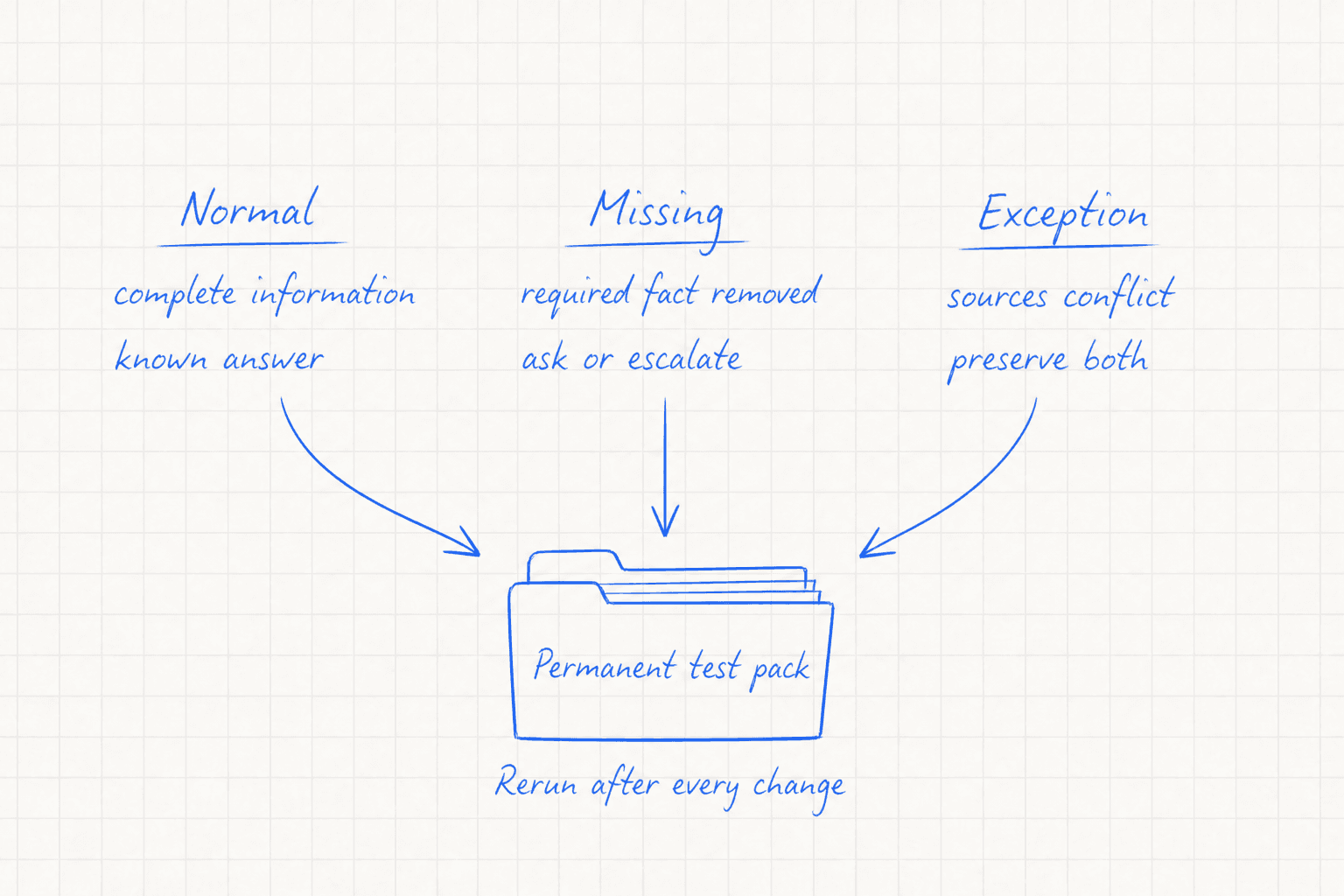
Keep these three cases as a permanent test pack. Run them again whenever instructions, source documents or tool settings change.
Turn Useful
Turn a useful trial into a team workflow
Once the trial produces reviewable results, move the working method out of one person’s chat history.
Store the instructions, approved references and output template in a versioned location. Give each file an owner and a review date. Record why changes were made so colleagues can understand whether a revision corrected an error or reflected a new policy.
Create a short operating note covering who may use the workflow, which information it may process and which decisions require escalation. New users should practise with the three test cases before handling live work.
Every live output should retain a named human reviewer where the work carries legal, financial or reputational consequences. Team adoption should follow evidence from reviewed cases rather than the apparent polish of the drafts.
Practical Next
A practical next step
Choose one repeated task that already has an accountable reviewer. Write down the approved sources, required output and stop conditions. Prepare a normal case, a case with missing information and one credible exception.
Run the workflow using redacted or non-sensitive material. Review every statement against its source and record the faults you find. If the same process works across all three cases, place the instructions and test pack under team ownership.
The aim is a small system that makes established work easier to repeat and inspect. Professional judgement remains with the person responsible for the outcome.
Checked sources